







Fits: listed for every body type, so choose your vehicle here to check this item against it.
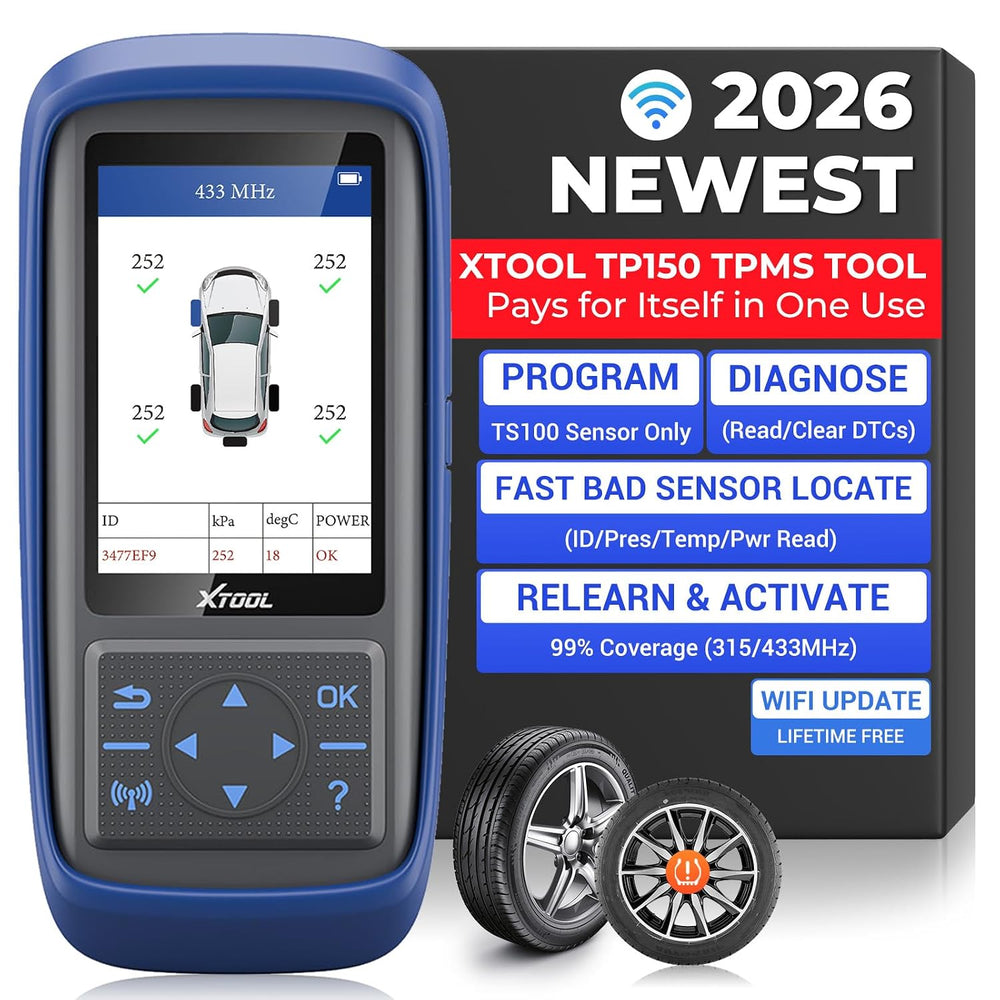
XTOOL TP150 Tpms Programming Tool, 2026 Universal Tpms Relearn Reset Tool
Which vehicles this suits
This item is not tied to one body type, so it is listed for sedans, hatchbacks, SUVs, pickups and minivans alike, which is the first thing to compare with your own car before you order.
If you are not sure, send your year, make and model to support@cabinmile.com and we will check it against the product before you order.
The measurement to check
The dimensions are in the product description below, and the vehicle finder on the home page shows where to measure the depth and width of each part of the car.
Delivery and returns
Delivery to any Canadian address is free and takes 7–14 business days from the day you order, with a tracking number sent by email.
You have 30 days from delivery to send it back, and we email you a prepaid return label, so a wrong size never costs you postage.
About this product
The XTOOL TP150 is a TPMS programming tool for vehicles with a 12V OBD2 port. It programs XTOOL TS100 and TS100 PRO sensors, and it reads sensor ID, pressure, temperature, battery status and frequency from sensors that are already programmed. The tool measures 9 x 2.5 x 18.3 cm and runs on the vehicle's OBD2 connection.
| Size | TP150 |
|---|---|
| Model | XD-TP150-WIFI-TPMS-SCAN |
| Style | Modern |
| Item dimensions (L x W x H) | 9 x 2.5 x 18.3 cm (3.5 x 1 x 7.2 in) |
Is this TPMS programming tool right for your vehicle and sensors?
The TP150 works only with pre-programmed sensors or XTOOL TS100 and TS100 PRO sensors, and it cannot program sensors from other brands. The sensors need to be original OEM units that are correctly programmed, or XTOOL sensors. The tool is limited to 12V OBD2 vehicles, so it does not cover vehicles without that port.
Before buying, check the Supports-Function Lists-TPMS page on the xtooltech website for your make, model and year. The maker lists coverage for American cars such as GMC, Buick, Chevrolet, Cadillac, Ford, Lincoln, Dodge, Jeep and Chrysler; European cars such as Bentley, Volkswagen, Skoda, Porsche, Opel, Vauxhall, Fiat, Peugeot, Citroen, Volvo, BMW, Mini, Land Rover and Renault; and Asian cars such as Mazda, Toyota, Lexus, Nissan, Acura, Subaru, Honda, Mitsubishi and Infiniti. Model-year examples include Buick Allure 2006-2015, Chevrolet Silverado 2000-2024, Ford F-Series 2006-2024, and Toyota Camry 2004-2024.
What the TP150 does for sensor programming and diagnostics
- The tool programs XTOOL sensors using four methods: Auto ID Generation, Manual Input ID, Copy ID by Activation, and Copy ID by OBD.
- It triggers almost all programmed 315 MHz and 433 MHz sensors that carry the right OE part number, and it can check an OE part number.
- It reads real-time sensor data covering sensor ID, tire pressure, temperature, battery status (normal or abnormal only) and frequency.
- It reads and clears TPMS diagnostic trouble codes, which helps locate a fault such as a tire losing pressure.
- It turns off the TPMS warning light after the relevant repair, and it offers four relearn methods: OBD Relearn, Stationary Relearn, Manual Relearn and Copy Relearn.
- It supports 13 languages and gives instructions once the correct make, model and year are selected.
How to use the TP150 for relearn, programming and sensor checks
To relearn sensors, choose OBD Relearn, Stationary Relearn, Manual Relearn or Copy Relearn from the tool's menu. For the majority of vehicles with TPMS from America, Asia and Europe, a relearning process is available online from the manufacturer. Some vehicles relearn on their own after 20 minutes of driving, which the vehicle manual confirms.
For a sensor check, activate the sensor first: without activation the tool cannot read its information. Once activated, the TP150 shows sensor ID, pressure, temperature, battery status and frequency, and you can compare the sensor position and battery status to judge when a sensor should be replaced. If a sensor has a problem, the reset will not go through.
If the tool shows a system configuration error, the maker's fix is to download TP200 software from xtooltech, connect the TP150 to a Windows PC (iOS is not supported), note the serial number and password under Settings – About, format the TP150 disk, and upload the software again.
Common questions about the TP150
Which sensors can the TP150 program?
The TP150 programs XTOOL TS100 and TS100 PRO sensors. It cannot program sensors from other brands.
How wide is the vehicle coverage for relearning?
The maker lists relearn coverage for American, Asian and European vehicles from 1996 to 2024, including Buick, Chevrolet, GMC, Ford, Toyota, Mazda, BMW, Volkswagen and others.
What does the tool show when it reads a sensor?
The TP150 shows sensor ID, tire pressure, temperature, battery status (normal or abnormal only) and frequency.
Does the TP150 work on a vehicle without an OBD2 port?
No, the TP150 is limited to 12V OBD2 vehicles, so it does not work on vehicles without that port.
Can the TP150 clear a TPMS warning light?
The TP150 turns off the TPMS warning light after the specific repair has been made.
Product details
| Brand | XTOOL |
|---|---|
| Product type | TPMS Programming Tool |
| Department | XTOOL Canada |
| Listed for | Every body type |
| Delivery | Free, 7–14 business days |
| Returns | 30 days from delivery, return label paid by us |
Delivery and tracking
Delivery to any Canadian address is free and usually takes 7–14 business days from the day you order. We email a tracking number once the parcel leaves the warehouse, and you can follow it on the track your order page.
Returns
If this is not right for your car, you have 30 days from delivery to send it back unused. Email support@cabinmile.com with your order number and we send you a prepaid return label, and the full process is in our refund policy.
Checking the fit
Each part of the car has its own measurement that decides the fit, such as the cargo floor depth for a trunk organizer or the gap beside the seat for a gap filler. The common questions on the home page show where to measure.
How Subscribe and save works
Pick Subscribe and save above to have this delivered every 30 days, 60 days or 90 days at 5% off the one-off price. You can skip a delivery, pause or cancel from your account whenever you like, and there is no minimum number of orders.
Multi-buy discount
The cart takes 10% off when it holds 2 items, 15% at 3 and 25% at 4 or more, and the items can be different products. The discount is applied automatically at the cart, so there is no code to enter.
Customer reviews
Same part of the car
More in XTOOL Canada
Help before you order
- GuideCar accessories guideWhat makes a good car accessory? A good car accessory fits the space you have, works in the weather you dri...
- FAQOrders, delivery and returnsAnswers on tracking, delivery times, return labels and subscriptions, all on one page.
- ContactAsk about your vehicleSend the year, make and model with the item you have in mind and we will check the fit for you.