


Fits: listed for every body type, so choose your vehicle here to check this item against it.
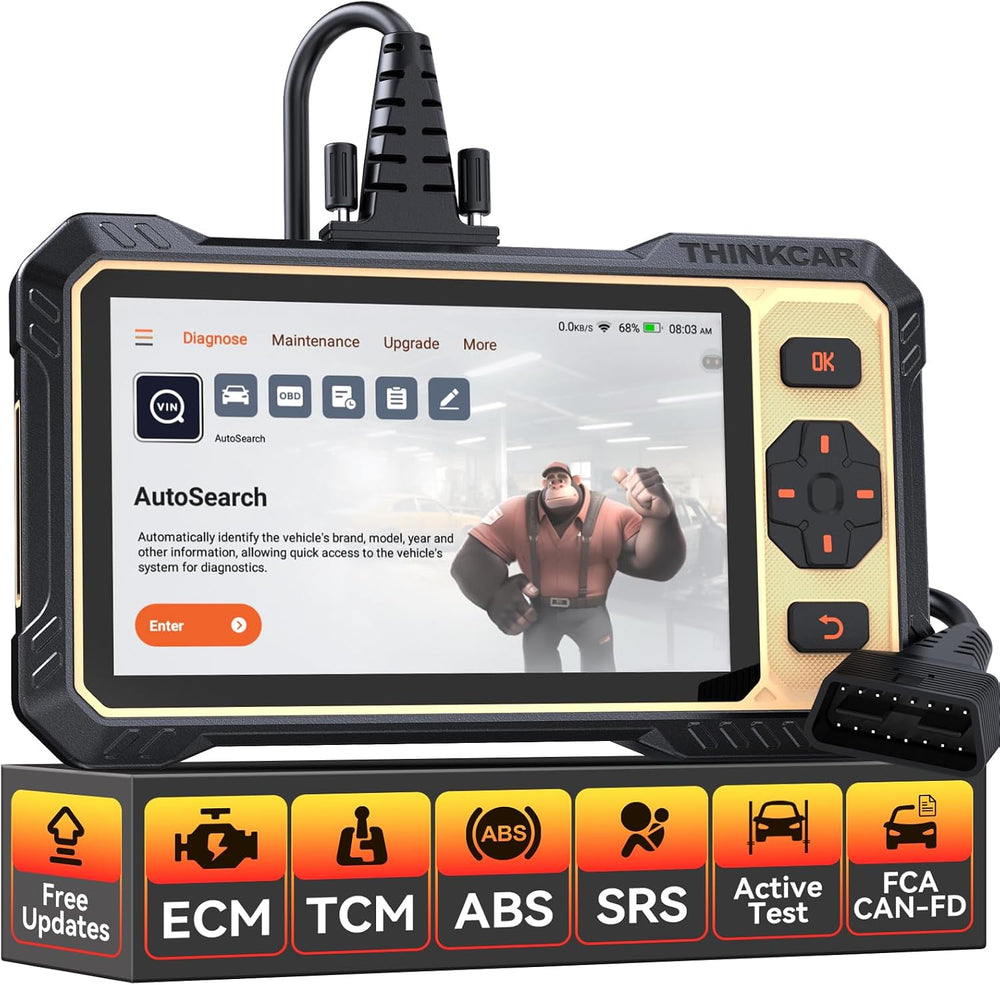
THINKCAR OBD2 Scanner with Bidirectional Active Test, 12 reset functions
Which vehicles this suits
This item is not tied to one body type, so it is listed for sedans, hatchbacks, SUVs, pickups and minivans alike, which is the first thing to compare with your own car before you order.
If you are not sure, send your year, make and model to support@cabinmile.com and we will check it against the product before you order.
The measurement to check
The dimensions are in the product description below, and the vehicle finder on the home page shows where to measure the depth and width of each part of the car.
Delivery and returns
Delivery to any Canadian address is free and takes 7–14 business days from the day you order, with a tracking number sent by email.
You have 30 days from delivery to send it back, and we email you a prepaid return label, so a wrong size never costs you postage.
About this product
Inside the box of this OBD2 scanner you get the THINKSCAN 662 handheld unit, and the software content is delivered as product e-manuals, instructional videos and fault code libraries rather than paper. The black device has a 6.2-inch HD touch screen with physical buttons, a 4150mAh battery and a 4-core 1.8GHz processor with 2GB RAM and 32GB ROM on Android 8. It reads and clears fault codes on vehicles built after 1996 that are OBDII-equipped, and it handles the ECM, TCM, ABS and SRS systems.
What the THINKSCAN 662 comes with
- A black THINKSCAN 662 unit with rubberized protection around the body.
- A 6.2-inch HD touch screen paired with physical buttons.
- Electronic manuals, videos that walk through the scanning functions and code libraries.
- 28 language options on the device.
| Size | THINKSCAN 662 US |
|---|---|
| Colour | Black |
| Model | THINKSCAN 662 OBD2 Scanner |
| Processor | 4-core 1.8GHz CPU |
| Memory | 2GB RAM + 32GB ROM |
| Screen | 6.2-inch HD touch screen |
| Operating system | Android 8 |
| Battery | 4150mAh |
| Languages | 28 |
Starting up and navigating the scanner
The scanner connects with plug-and-play, so the connection to the car is the first step. If a boot loop appears during first use or while operating the device, the manufacturer advises charging it for 30 minutes on a 5V/2.5A charger before switching it on. A downward sliding shortcut portal opens setup, and a drawer portal opens the function shortcuts. Screenshots, screen recording and volume are handled from the same setup area.
Automatic VIN recognition pulls the vehicle identity so the tool can select the matching software. Free upgrades arrive as one-click updates over Wi-Fi, which covers the fault code libraries and the software itself.
Battery and power
The 4150mAh battery runs the 6.2-inch screen and the 4-core 1.8GHz CPU, which together hold 2GB RAM and 32GB ROM on Android 8. When a boot loop appears during first use or during operation, the manufacturer's instruction is a 30-minute charge on a 5V/2.5A charger before the device is powered on again. Everything else runs from that internal battery and the plug-and-play connection to the car.
Tests, systems and reset functions
Bidirectional control is the main function of this bidirectional scan tool: it requests information from the vehicle's ECU or sends commands to an ECU module, and it tests whether executing components in the electronic control system work normally. Active tests reach ABS, fuel injectors, throttle adjustment, coolant fans, radiator fans, coolant pumps, the EV.AP test, fuel trim reset, the injector buzz test and the pump and value test.
Coverage runs across ECM, TCM, ABS and SRS. The tool reads and clears fault codes and analyzes data streams from those systems. Twelve reset functions are on board: airbag reset, ABS bleeding, BMS, brake reset, D.P.F, throttle adaptation, injector coding, oil reset, steering angle reset, gearbox, TPMS and more. Real-time ECU data shows as text or as a 4-in-1 merged waveform chart, inspection reports can be saved, shared, printed or emailed, and historical diagnostic records stay on the device.
A built-in feedback module passes repair operation recommendations from certified professionals. The 28 languages on the device cover the menus and the diagnostic screens.
Which cars and accounts the tool needs
The scanner works with OBDII-equipped vehicles built after 1996, and it supports most protocols including CAN FD. Two things limit coverage. Integrated AutoAuth lets the tool diagnose 2018 and newer FCA cars fitted with an SGW, but FCA AutoAuth accounts do not ship with the device; the buyer registers and pays separately on the official FCA AutoAuth website. For vehicle-specific compatibility, send the vehicle information to check compatibility before purchase.
Questions buyers ask before ordering
Which vehicles can this scanner be used on?
It works with OBDII-equipped vehicles built after 1996 and supports most protocols including CAN FD.
Does the 2018+ FCA support include the AutoAuth account?
No, the AutoAuth account is not in the box; the buyer registers and pays for it separately through the official FCA AutoAuth website.
How do I check whether it covers my car?
Send your vehicle information for a compatibility check before you buy.
What happens if the device keeps restarting when I first use it?
Charge it for 30 minutes with a 5V/2.5A charger, then power it on.
Which systems does the scanner reach?
It handles ECM, TCM, ABS and SRS, and reads and clears fault codes from them.
Product details
| Brand | thinkcar |
|---|---|
| Product type | OBD2 Scanner |
| Department | Dash cams and charging |
| Listed for | Every body type |
| Delivery | Free, 7–14 business days |
| Returns | 30 days from delivery, return label paid by us |
Delivery and tracking
Delivery to any Canadian address is free and usually takes 7–14 business days from the day you order. We email a tracking number once the parcel leaves the warehouse, and you can follow it on the track your order page.
Returns
If this is not right for your car, you have 30 days from delivery to send it back unused. Email support@cabinmile.com with your order number and we send you a prepaid return label, and the full process is in our refund policy.
Checking the fit
Each part of the car has its own measurement that decides the fit, such as the cargo floor depth for a trunk organizer or the gap beside the seat for a gap filler. The common questions on the home page show where to measure.
How Subscribe and save works
Pick Subscribe and save above to have this delivered every 30 days, 60 days or 90 days at 5% off the one-off price. You can skip a delivery, pause or cancel from your account whenever you like, and there is no minimum number of orders.
Multi-buy discount
The cart takes 10% off when it holds 2 items, 15% at 3 and 25% at 4 or more, and the items can be different products. The discount is applied automatically at the cart, so there is no code to enter.
Customer reviews
Same part of the car
More in Dash cams and charging

Help before you order
- GuideCar accessories guideWhat makes a good car accessory? A good car accessory fits the space you have, works in the weather you dri...
- FAQOrders, delivery and returnsAnswers on tracking, delivery times, return labels and subscriptions, all on one page.
- ContactAsk about your vehicleSend the year, make and model with the item you have in mind and we will check the fit for you.